Remini MOD APK (Premium Unlocked) Download 2026
Remini MOD APK is a modified (unofficial) build of Remini, the AI-powered photo-enhancement app for Android that restores old, blurry or low-resolution photos. MOD distributors advertise these builds as unlocking Premium features — such as unlimited AI enhancements — without a subscription. This in-depth guide covers what Remini is, how the official app compares with MOD versions, what MODs typically claim to offer, how to install one step by step, the genuine pros and cons, frequently asked questions, honest safety notes, and tips for getting the best results from AI photo enhancement.
New to modified apps? Read our MOD APK vs official app comparison and our MOD APK safety guide before you install anything.

Remini MOD APK Information
| App Name | Remini |
| MOD Info | Premium Unlocked (as advertised by MOD distributors) |
| Category | Photography |
| What It Does | AI photo enhancement, restoration & upscaling |
| Size | Varies by device |
| Price | Free (official app offers optional Premium subscription) |
| Updated | 2026 |
What Is Remini?
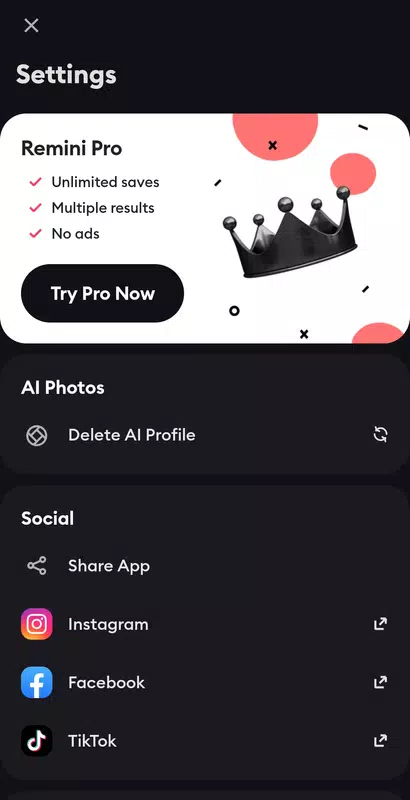
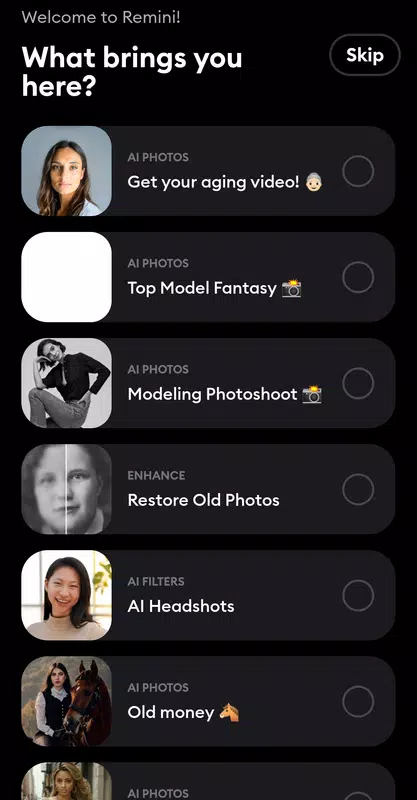
Remini is an AI photo-enhancer app that became famous for turning blurry, pixelated or decades-old photos into sharp, detailed images. Its artificial-intelligence models reconstruct faces, sharpen details, upscale resolution, colorize black-and-white photos and clean up noise — tasks that once required professional software and skill.
The app went viral for restoring family photos and for its AI-generated portrait trends, and it remains one of the most downloaded photography apps on Android. The official app is free to download with optional in-app purchases: free users get a limited number of enhancements (often with ads or waiting times), while the Premium subscription unlocks unlimited processing and faster queues.
Official App vs Remini MOD APK: Key Differences
| Aspect | Official Remini | Remini MOD APK |
| Source | Google Play Store | Third-party websites (unofficial) |
| Enhancement limits | Limited free uses; unlimited via Premium | Advertised as unlimited (unverified) |
| Processing queue | Priority for Premium subscribers | Claimed priority (unverified) |
| Ads / waiting times | Present in free tier | Advertised as removed (unverified) |
| Photo privacy | Governed by Remini’s published privacy policy | Unknown — modified code could handle uploads differently |
| Updates | Automatic via Play Store | Manual download and reinstall |
| Security screening | Scanned by Google Play Protect | Not verified — scan every file yourself |
Remini MOD APK Features (As Advertised)
MOD distributors commonly advertise the following. The actual contents of any MOD file vary between sources and cannot be independently verified, so treat every claim with healthy skepticism:
- Premium unlocked — unlimited AI enhancements without a subscription.
- No ads or waiting times — instant processing advertised.
- All AI tools unlocked — face enhancement, background enhancement, colorization, denoising and upscaling.
- HD export — high-resolution output for restored photos.
- Video enhancement — where the official app supports it, advertised as unlocked.
How to Download and Install Remini MOD APK
Note: Modzyra has not yet published a download link for this MOD. The steps below apply once a verified download is listed on this page — never download APKs from random pop-up sites.
- Enable Install unknown apps for your browser: Settings > Apps > Special app access > Install unknown apps.
- Download the Remini MOD APK file from the link that will be listed on this page.
- Open the downloaded file and tap Install.
- Confirm the installation when prompted.
- Launch Remini and grant only the permissions it genuinely needs (storage/media access for selecting photos).
- Think carefully before uploading sensitive personal photos to any unofficial build (see the privacy notes below).
See our full tutorial: How to Install MOD APK on Android. If installation fails: MOD APK Not Installing and App Not Installed Error Fix.
Pros and Cons of Remini MOD APK
Pros
- AI photo restoration advertised without limits or subscription cost.
- Can rescue old, blurry or damaged family photos.
- Easy to use — one-tap enhancement, no editing skills needed.
- Ad-free experience claimed by MOD distributors.
Cons
- Unofficial builds can be repackaged with malware or spyware.
- Photo privacy risk: enhancement requires uploading your photos for AI processing — a modified app could route them anywhere.
- No automatic updates; no customer support.
- AI results vary — faces can look artificial or “plasticky” on heavy enhancement.
- Violates the developer’s terms of service.
Is Remini MOD APK Safe?
Honestly: no MOD APK can be called categorically safe, and photo apps deserve extra caution because of what you feed them. Remini’s AI processing works on images you upload — often irreplaceable family photos, IDs or pictures of children. A modified build could, in principle, intercept those uploads.
- Malware: sideloaded APKs bypass Play Protect screening. Scan every download with reputable antivirus software.
- Photo privacy: avoid enhancing sensitive images (IDs, documents, intimate photos) in any unofficial build — or better, in no MOD at all.
- Account risk: signing into a MOD with your Google account or Remini account could expose credentials.
- Fake “Pro” apps: the popularity of Remini makes it a favorite disguise for copycat apps — verify you are installing what you think you are.
If you want zero risk, use the official free tier or the legitimate Premium subscription. If you proceed with a MOD, use it only for non-sensitive photos, keep originals backed up, and read our MOD APK safety guide first.
Remini MOD APK FAQs
What is Remini MOD APK?
It is an unofficial, modified build of the Remini Android app that distributors claim unlocks Premium AI-enhancement features — such as unlimited processing — without a subscription.
Is Remini MOD APK free?
MOD distributors offer their builds free of charge, but “free” comes with trade-offs: security risks, no updates and no support. The official app is also free to download, with Premium sold via in-app purchases.
Does the MOD really give unlimited enhancements?
That is the standard claim. However, AI processing happens on servers — features that depend on the developer’s backend may not work in a modified client, regardless of what distributors advertise.
Can Remini fix very old or damaged photos?
Remini’s AI is genuinely impressive on blurry, low-resolution and faded photos, but it cannot recover detail that is completely gone, and heavy processing can produce artificial-looking faces. Results vary by photo.
Is it safe to upload personal photos to a MOD?
We advise against it. Enhancement requires uploading images for processing, and a modified app’s data handling cannot be verified. Use non-sensitive photos only — or stick to the official app.
Will the MOD update automatically?
No. You will need to manually download and install each new MOD release.
Does Remini work on iPhone?
Yes — Remini is available officially on iOS, but MOD APKs are Android-only and cannot be installed on iPhones.
Tips for Better Results with Remini
- Start with the best source: scan printed photos at high resolution instead of photographing them — AI works better with cleaner input.
- Enhance once, gently: running enhancement multiple times compounds artifacts; one careful pass usually looks best.
- Compare before/after: use the comparison slider to check the AI has not altered faces beyond recognition.
- Finish in a photo editor: after AI enhancement, fine-tune brightness and color in an editor like PicsArt for a natural result.
- Back up originals: always keep the unedited photo — AI changes cannot always be undone.
Related Photo & Editor MODs
- PicsArt MOD APK — photo editing and design to polish enhanced images.
- PicsArt Gold vs Free — whether the premium tier is worth it.
- GCam APK — Google Camera ports for better photos at capture time.
- CapCut MOD APK (Pro Unlocked) — turn enhanced photos into video edits and Reels.
- KineMaster MOD APK — another strong mobile video editor.
- Best Video Editor MOD APKs 2026 — our editor roundup.
Browse every app in our Android Apps collection.
Disclaimer: MOD APKs are unofficial modifications not affiliated with the original developers. Modzyra does not host APK files directly; download links will be added once verified. Installing modified apps carries security and legal risks, and uploading personal photos to unofficial builds carries privacy risks — proceed at your own discretion.


